

Businesses are presented with more software development options than ever in 2026. With a no-code platform, you can build an entire web-based application in a weekend or a sophisticated internal tool with a low-code builder in a few weeks, or invest in custom development to create what your business wants from the smallest pixel to the API endpoint. However, several times you are puzzled, and with the help of thought, you are confused about low-code / no-code vs. custom development.
But what is the method that is really right in your case? The solution is hardly ever self-evident. Low-code and no-code platforms have become fully fledged, whereas custom development is the standard of complex, scalable, and highly differentiated products.
Here, no-code versus low-code versus custom development is a breakdown of the major differences between no-code, low-code, and custom software development in terms of speed, cost, scalability, security, and real-world applications in 2026 so you can make the correct choice in relation to your team, budget, and phase of growth.
What Are No-Code, Low-Code, and Custom Development?
It is useful to question what each of the three approaches means by its thing before even the comparison of the approaches.
What is No-Code Development?
No-code solutions enable any individual—nontechnical or otherwise—to create applications in visual drag-and-drop, template-based, and automated workflow platforms. No computer code is required. Webflow, Bubble, Glide, and Zapier are popular no-code tools.
No-code is perfect when the product requires non-technical founders, a non-technical operations team, and non-technical marketers to be able to move quickly without the need to call on a developer.
What is Low-Code Development?
Low-code is a middle-ground between no-code and conventional development. They offer a visual environment of development but enable developers to add functionality with code where necessary. They include platform vendors such as OutSystems, Mendix, Microsoft Power Apps, and Retool.
Low-code increases the rate of development—typically 4 to 10 times faster than traditional code—but provides flexibility to the developer to fully express complex logic, integrations, and custom UI components.
What is Custom Software Development?
Custom development is the development of an application in programming languages like Python, JavaScript, Java, or Go. All features, architecture choices, and interventions are tailored to meet your needs.
It is a model that needs professional developers, extends the timeframes, and requires more initial investment yet promises to offer limitless flexibility, complete ownership, and scalability over time.
No-Code vs. Low-Code vs. Custom Development: Complete Side-by-Side Comparison
| Factor | No-Code | Low-Code | Custom Development |
| SPEED & DELIVERY | |||
| Speed to Launch | Days to weeks | Weeks to months | Months to years |
| Time to MVP | 1–7 days | 2–8 weeks | 3–12 months |
| Iteration Speed | Very fast | Fast | Slower |
| Deployment Effort | Minimal (platform-managed) | Low to moderate | High (DevOps required) |
| TECHNICAL REQUIREMENTS | |||
| Technical Skill Required | None | Moderate | High |
| Who Can Build It | Anyone (citizen developer) | Developers + business users | Experienced developers only |
| Developer Dependency | None | Low to moderate | High |
| DevOps / Infrastructure Knowledge | Not required | Minimal | Essential |
| Learning Curve | Very low | Moderate | High |
| FLEXIBILITY & CONTROL | |||
| Customisation Level | Low | Medium | Unlimited |
| UI/UX Control | Template-bound | Partial | Pixel-perfect |
| Business Logic Complexity | Simple rules only | Moderate complexity | Any complexity |
| Workflow Automation | Basic, pre-built | Extended with code | Fully custom |
| Proprietary Feature Development | Not possible | Limited | Fully possible |
| SCALABILITY | |||
| Scalability Ceiling | Low | Moderate | No ceiling |
| Traffic Handling | Low to medium | Medium | Enterprise-grade |
| Data Volume Support | Limited | Moderate | Unlimited |
| Multi-Region / Global Deployment | Platform-dependent | Partial | Fully supported |
| Performance Optimisation | Not available | Limited | Full control |
| DEVELOPMENT COST | |||
| Upfront Cost | Low (SaaS subscription) | Medium | High |
| Long-Term Cost | Rising SaaS fees | Platform + dev fees | Lower over time |
| Ongoing Maintenance Cost | Low (platform handles it) | Low to moderate | High |
| Hidden Costs | Feature paywalls, user limits | Licensing tiers, dev hours | Infrastructure, team salaries |
| Cost Predictability | Medium (tier changes) | Medium | High (owned asset) |
| SECURITY & COMPLIANCE | |||
| Security Control | Platform-managed only | Partial control | Full control |
| Data Sovereignty | Platform-controlled | Partial | Fully owned |
| Regulatory Compliance (GDPR, HIPAA) | Limited / dependent on vendor | Partial | Fully achievable |
| Audit Logging & Access Controls | Basic | Moderate | Fully custom |
| Penetration Testing Access | Rarely available | Limited | Full access |
| INTEGRATIONS | |||
| Integration Depth | Pre-built connectors only | Pre-built + custom APIs | Fully custom |
| Third-Party API Support | Limited to marketplace | Extended via code | Unlimited |
| Legacy System Connectivity | Poor | Moderate | Excellent |
| Enterprise System Integration (ERP, CRM) | Basic | Moderate | Deep |
| Custom Webhook / Event Handling | Limited | Partial | Full |
| OWNERSHIP & RISK | |||
| Code Ownership | None (platform owns it) | Partial | Full |
| Vendor Lock-in Risk | Very high | High | None |
| Data Portability | Difficult | Moderate | Easy |
| Platform Dependency Risk | Very high | High | None |
| Migration Difficulty | Hard | Moderate | Easy |
| TEAM & ORGANISATION FIT | |||
| Best For | SMBs, MVPs, internal tools | Mid-market, digital teams | Enterprises, complex products |
| Ideal Team Size | Solo to small team | Small to mid-size team | Mid to large engineering team |
| Citizen Developer Friendly | Yes | Partially | No |
| Suitable for Regulated Industries | Rarely | Sometimes | Always |
| Long-Term Strategic Fit | Low (for complex products) | Medium | High |
Important Insight: No-code wins on speed and readiness; low-code wins on speed and flexibility; custom development wins on flexibility, security, and scalability.
When to Use No-Code Development
No-code is an otherwise quite potent option in the appropriate environment. The following are the scenarios in which it is the most reasonable.
You Need to Move Fast
No-code platforms cannot be beaten when it comes to speed if you are validating a business idea, creating an MVP, or a landing page in a short period. You no longer have to wait days (not months) to take your concept to a live product – without needing to wait on development sprints or engineering bandwidth.
You Have a Non-Technical Team
No-code eliminates the reliance on developers. Teams producing marketing content, operations managers, and individuals alone can create and manage tools. This makes no-code such an attractive option in the case of citizen development and internal automation.
Your requirements are standard
Unless you have a significant divergence in needs that a tower has already addressed to e-commerce, forms, simple databases, landing pages, or internal dashboards, no-code can cleanly serve your needs without a workaround.
Limitations of No-Code Platforms
No-code is associated with real limits that can be big bottlenecks as your product expands:
- Minimal customisation – you are restricted to what the platform can support by default.
- Scalability ceiling – most no-code tools falter at high traffic or when faced with very complex data models.
- Vendor lock-in – It can be challenging and expensive to move out of a no-code platform.
- Security restrictions – there is limited data storage, data access control, and compliance.
- Raising SaaS costs – platform fees can skyrocket with usage and are growing questionable.
When to Use Low-Code Development
The midground that low-code is most productive in satisfies a broad swath of enterprise and mid-market applications in 2026.
You Need Speed Without Sacrificing Flexibility
Low-code will speed up delivery greatly. Typically, industry standards indicate that low-code talent can decrease the software development period by 60 to 90 percent relative to traditional coding on typical application standards. Simultaneously, the drop-in custom code can allow you not to be restricted to platform features, as no-code limits you.
Your team includes developers
Low-code does not take the place of developer expertise—it is a multiplier. A low-code platform will allow developers well-informed of architecture, ensure software security during development, and follow performance best practices to gain much more than a non-technical citizen developer. Even a capable low-code developer has the facility to create a robust and production-ready application much quicker than a common coding technique.
You are modernizing legacy systems
Legacy application modernization projects are being done by low-code platforms. They enable teams to re-architect the old interfaces, automate manual processes, and link up with preexisting enterprise systems—without having to rewrite core infrastructure.
Limitations of Low-Code Platforms
- Scalability of performance compared with custom application performance.
- Platform licensing charges that may be high in case of large enterprise deployments.
- Little ability to control underlying architecture, infrastructure, and database structure.
- Vendor dependency—any platform changes, pricing changes, or deprecations can cause a change to your roadmap.
- Inappropriate with highly complex, differentiated, or proprietary systems.
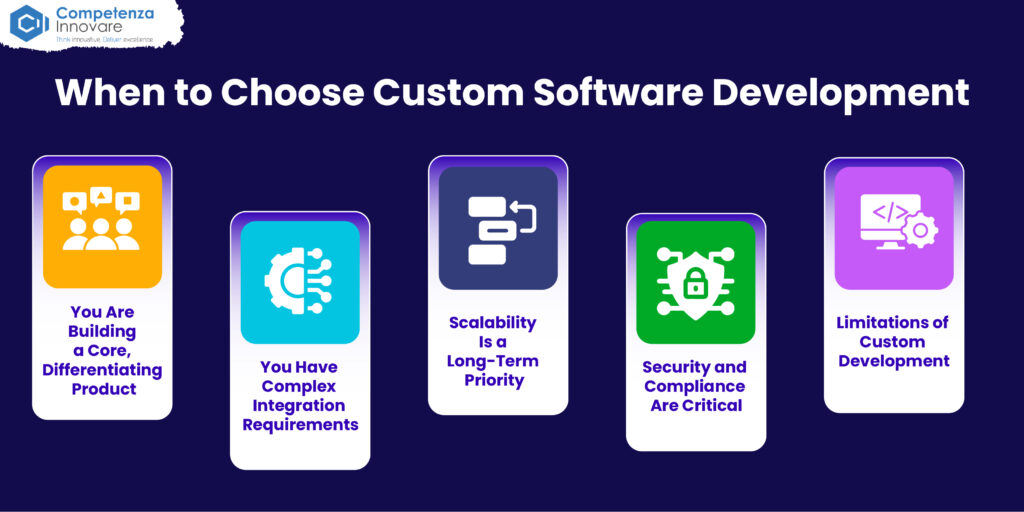
When to Choose Custom Software Development
Custom development is the optimal option in those situations when flexibility, ownership, and long-term performance are a must.
You Are Building a Core, Differentiating Product
Custom development is nearly always the right decision should your business be your software, a SaaS product, a fintech platform, or a healthcare system. The product is your point of competitive advantage. Applications developed on the generic low-code infrastructure do not in most cases provide the richness of product experience that a true custom application provides.
You Have Complex Integration Requirements
Custom development offers you full control of API development, data frameworks, and integrations with third parties. If your application must support many systems in the enterprise, handle large amounts of data, or work within a highly regulated industry, then the only way to be certain to have the scale required is to have a custom development.
Scalability Is a Long-Term Priority
Seemlessly scalable, custom applications can be designed at their start to support millions of users and grow with your business. Not only do low-code and no-code platforms have certain imposed architectural limitations, but these limitations become even more restrictive with the growth of your application and the traffic.
Security and Compliance Are Critical
Security and regulatory compliance requirements in the financial service industry and other related sectors like health, a legal sector, and government cannot be compromised. Tailor-made development lets you centrally handle data storage, access control, encryption, audit logging, and compliance structures—features unavailable to low-code and no-code offerings sometimes.
Limitations of Custom Development
- Much greater initial expenditure and delay to market.
- Requires competent developers and architectural and DevOps engineers.
- Maintenance, security maintenance, and infrastructure overhead.
- Increased risk where the requirements are not defined at the beginning.
Cost Comparison: No-Code vs. Low-Code vs. Custom Development
One of the most critical aspects in the selection of the development approach is cost. Below is a realistic scenario of 2026.
No-Code Development Cost
No-code services are billed by subscription, and the charges range from free to a few hundred dollars per month on business plans. These are cheap when it comes to initial expenses, but they will get expensive with increasing user or data volume. No development salaries or charges and can pay for premium templates, integrations, or agency setup fees.
Low-Code Development Cost
Depending on the platform and usage, in general, a low-code platform will cost a business or enterprise plan between $400 and 2,000+ a month. You will also require developers’ time—much less of it than custom development—which comes at a cost in terms of salary or contractor costs. The overall cost of ownership is significantly less than bespoke development of most commodity business applications.
Custom Development Cost
Tailor-made is the most expensive to start. A basic web application may cost between 30,000 and 100,000 to design. It is not hard to spend over 500000 on a complicated enterprise application. Nonetheless, no platform fees are incurred once constructed, and the total cost of ownership can be lower in the long term compared to a series of SaaS subscriptions over five or more years.
Rule of Thumb: Custom development is most often the correct long-term investment in case that application can return costs of development in 12 months by way of efficiency or revenue.
Low-Code ROI: Is It Worth It for Enterprises?
The ROI case is becoming more and more convincing to enterprises considering low-code a subset of a larger, digital transformation platform strategy. Low-code decreases development backlogs, enables citizen developers to create approved internal applications, and enables IT to devote engineering resources to high-value and complex work.
The major ROI factors of enterprise low-code adoption, such as shorter time to market on internal tools, lower cost in conventional types of applications, lower maintenance burden in platform-managed infrastructure, and the capability to quickly prototype and experiment with new workflows to scale without full custom builds, are present.
With that said, business organizations should take into consideration platform licensure and the necessity of governance infrastructures such as citizen development and the prospect of potential technical debt in low-code systems with low governance.
Not sure which development approach fits your business? Let our experts help you choose the right solution.
Practical Decision Framework – No-Code vs. Low-Code vs. Custom Development
This framework can be used to make your no-code/low-code/custom development decision based on your situation.
Choose No-Code Development If:
- You are developing an MVP or a proof of concept and have to be shipped in days.
- Your company is resource-less in terms of developers and needs simple requirements.
- The app is in-house, low-volume, and does not deal with sensitive information.
- You are keen to confirm market fit prior to investing in custom development.
Go for low-code development if:
- You must provide business applications more rapidly than could be done with a traditional development.
- Your team consists of developers that can expand the platform where necessary.
- You are bridging old workflow or developing in-house enterprise tools.
- You also require moderate integrating possibilities and a work-quality output.
Select Custom Software Development If:
- Your software is a fundamental product that spearheads competitiveness.
- You have complex, proprietary, or performance technical needs.
- Business requirements are critical in security, compliance, or data sovereignty.
- You are intending to grow to a high number of users in the long term.
- You want to own and have control of your technology stack.
The Hybrid Approach: The Best of All Three Worlds
In 2026, the more practical businesses are not deciding between these two methodologies—they are integrating them in a strategically planned way. One of the typical patterns is as follows:
- No-code internal automation, rapid prototyping, and marketing processes.
- Low-code to departmental apps, digitization of workflows, and customer-oriented ones.
- Tailored development of core product experiences, mission-critical systems, and proprietary platforms.
This hybrid model enables organizations to invest development resources where they can generate the greatest value and enable the non-technical teams to self-serve to address more straightforward needs. The trick here is to put in place a well-defined regime of governance that would help to determine what kind of tool can be deployed on what kind of problem, etc., and to ensure that the development of citizens does not introduce an uncontrollable security or compliance risk.
Final Thoughts: Making the Right Choice in 2026
The discussion of low-code, no-code, and custom development does not concern the question of which method is better than the other objectively. It touches upon which strategy is correct for your personal objectives, team, budget, and schedule.
No-code has liberalized software development and will be the quickest route to getting an idea to a product for non-technical developers. Low-code has grown to be a proven enterprise development method that is able to provide real business value at a greatly lower cost and time. And custom development is impossible to replace competitive and highly differentiated products that make up the foundation of competitive businesses.
The correct response in 2026 is neither this nor that—it is sound knowledge of which tool to apply to which job and having strategic clarity in which to use each.
Not even sure what type of development is appropriate to your project? The competenza software development team of experts assists companies in assessing, strategizing, and implementing the appropriate approach to software development—either the quick MVP idea or the full-scale, enterprise-level custom software.
Frequently Asked Questions
What is the primary distinction between no-code, low-code, and custom development?
No-code allows anyone to create applications without code as the result of drag-and-drop tools. Low-code introduces the capability to create custom code on a visual platform. Custom development develops it all the way up and provides maximum flexibility but needs more time, budget, and technical knowledge.
Can low-code development be used to develop enterprise applications in 2026?
Yes, in the applications of most. Low-code solutions such as OutSystems, Mendix, and Power Apps now support complex workflows, legacy integrations, and compliance. They are, however, most appropriate in the internal tools and departmental application—not a very complex or mission-critical proprietary system.
When is custom development better or worse than low-code or no-code?
Use custom development in cases where your software is a core revenue-generating product, when scaling to enterprise performance is required, or when security and regulatory compliance, e.g., GDPR or HIPAA compliance, cannot be compromised. When software is your competitive advantage, then long-term investment is custom development.
What are the unseen expenses of no-code and low-code platforms?
Massive subscription fees per usage, premium feature access under higher levels, costs to migrate to a new platform in case your workload grows, and a growing technical debt in under-managed systems. Always project the total cost of ownership in three to five years before committing.
Are no-code and low-code platforms scalable for enterprises?
Generally, no. No-code systems reach their peak performance in a short time. Low-code is more scalable, but there are limits to architecture. Custom development alone provides you the ability to design unlimited scalability, horizontal growth of infrastructure, and optimization of performance, which you require with a true enterprise product.
How do you think you can develop an MVP in 2026?
No-code or low-code. Both enable you to test your idea on real users inside days and weeks at a fraction of the custom software development costs. Only develop a resort to MVPs when the core competitive advantage is highly technical and it is in fact unable to be emulated on a current platform.
Can a hybrid solution be the combination of all three methods?
Definitely, yes—and it is becoming 2026 normal. Consider no-code for internal automation and prototyping, low-code for departmental tools and workflow digitization, and custom development for your core product and mission-critical systems. The trick to making all of it work is ensuring that there is clear governance at all three levels.