

Manual processing continues to be in place in many businesses in their day-to-day operations of approvals, data entry, document manipulation, employee onboarding, and customer requests. Although such processes can be effective when dealing with smaller workloads, they can tend to slow down, become more costly, and be error-prone as the business expands. The typical problems with manual workflows are slowed-down approvals, duplication of work, non-visibility, and frequent errors, which affect productivity and efficiency in operations. It is here that workflow automation comes in handy. With workflow automation solutions, an organization is able to automate repetitive business processes, automate approvals, and make sure that the workflow is automatically taking one stage to the next. Workflow automation software is used to save businesses time, maintain accuracy, and lower operational costs instead of the use of emails, spreadsheets, and manual follow-ups.
The largest differences, in terms of comparing manual process vs workflow automation, exist in the aspects of cost, time, and accuracy. By automating manual efforts and minimizing human errors, automated workflows assist organizations to gain cost savings through workflow automation, enhance consistency across future processes, and achieve greater workflow automation ROI. Workflow automation offers a scalable opportunity to optimize operations, whether you want to decrease manual processes in business, enhance efficiency, or help grow in the future.
This blog will compare the concept of manual process and workflow automation and discuss how automation can assist businesses to remove inefficiencies, enhance accuracy, and develop faster and more dependable workflows.
Understanding Manual Processes and Workflow Automation
In every business, there exist a series of procedures used in the everyday tasks, including invoice approval, employee onboarding, customer requests, and document processing. The processes can be done manually or by automated workflow. Knowing the distinction between the two assists businesses to know areas where they can undergo improvements in efficiency and productivity.
What Is a Manual Process?
A manual process uses employees to fill and handle tasks via emails, spreadsheets, paper forms, or several systems. Every process involves human intervention, both in data entry and approvals and in follow-ups and recordkeeping.
Common examples of manual processes include:
- Entering data into spreadsheets
- Sending approval requests through email
- Tracking tasks manually
- Processing invoices and purchase orders
- Managing employee requests
Some manual workflow might be acceptable within small teams, though some manual workflow issues can be experienced, such as delays and errors, duplication of work, and low visibility with increased work.
What Is Workflow Automation?
Workflow automation entails the automatic completion and management of repetitive tasks by utilizing a software program to aid in the execution with the help of a set of rules. The system takes care of the approvals, notifications, assigning tasks, or providing updates rather than manually moving the work through each step.
Business workflow automation solutions provide businesses with the capabilities to:
- Automate repetitive business tasks
- Reduce manual data entry
- Speed up approvals
- Improve process visibility
- Increase productivity
This assists teams to work more quickly, as well, and less energy is needed to control routine procedures.
Why Businesses Are Moving Toward Automation
Increasing business means that the management of workflows would be more complicated and time-consuming. Organizations are moving towards automation in order to minimize the amount of manual operations in businesses to enhance efficiency.
Workflow automation helps businesses:
- Save time on repetitive tasks
- Reduce operational costs
- Improve accuracy
- Increase productivity
- Scale processes more efficiently
Companies that opt to eliminate manual business processes can establish a quicker and more predictable workflow to allow long-term growth in the business.
Manual Process vs Workflow Automation: Key Differences
When it comes to the distinction between manual processes vs workflow automation, it extends beyond substituting paperwork or spreadsheets. It influences the effectiveness with which work is done, the ease with which the processes to track are enabled, and the ability of a business to cope with expansion. The knowledge of these differences can assist organizations in selecting the appropriate strategy towards enhancing productivity and operational efficiency.
Process Execution
Manual processes require the help of employees in performing tasks and approvals and in following up on work, and this may slow the operations. A workflow automation is the process of utilizing set rules to direct tasks and approvals automatically to aid a business in completing processes more quickly and with fewer manual tasks.
Visibility and Tracking
When working manually, it may become difficult to monitor the progress due to the distribution of information over several systems. Automation of workflow also offers centralized monitoring in real-time so that tasks are easier to track, progress is monitored, and bottlenecks can be identified.
Scalability
The higher the workloads, the more staff and resources are needed to handle the demand in the manual processes. Increasing workloads can also be managed without excessive workforces or raising operation expenses, as workflow automation is able to cope with these increasing workloads.
Cost Comparison: Manual Processes vs Workflow Automation
One of the largest determinants during the comparison between manual processes and workflow automation is cost. Although manual workflow might appear to be cheaper in the short run, it can be significantly costly in the long run with regard to delays, errors, and redundancy. Automating workflows assists companies to minimize these costs and to increase efficiency.
Hidden Costs of Manual Processes
Manual processes make employees utilize time in performing activities like data typing, authorizations, document validation, and follow-up. Such operations raise the labor expenses and might cause delays and errors, which take time to correct.
An illustration of this is the time a finance department can take hours to complete tasks by reviewing invoice documentation automation software, issuing approvals, and sending subsequent responses, all done manually. The more work done, the more these inefficiencies will be expensive.
How Workflow Automation Reduces Costs
Approval robots simplify the repetitive processes of workflow by automatically forwarding approvals, sending messages, and updating documents. This minimizes time spent working in administration, accelerates work, and gives the employees time to work on other significant activities.
Such enhancements enable companies to gain workflow automation cost savings and enhance overall productivity.
Understanding Workflow Automation ROI
Time savings, labor cost reductions, and error reduction are the factors of high workflow automation ROI. Automating business tasks can make routine automation of business workflows more efficient and execute tasks within a shorter period, using fewer resources.
| Cost Factor | Manual Process | Workflow Automation |
| Labor Costs | High | Lower |
| Error Correction | Frequent | Minimal |
| Process Delays | Common | Reduced |
| Compliance Risk | Higher | Lower |
| Scalability Costs | Significant | Minimal |
Workflow automation enables businesses to decrease flexible expenditures and promote long-term prosperity by automating their manual labor and streamlining their operations.
Time Comparison: How Automation Accelerates Business Operations
In business, time is a critical aspect. Manual processes also tend to hamper functionality as workers have to fill and monitor each process manually. Workflow automation helps the companies to complete their services within a shorter time by reducing wait time and eliminating repetitive efforts.
Time Lost in Manual Workflows
Manual operations may experience several hand-offs and follow-ups, which are time-consuming. It might take the employees hours to send emails, wait to receive approval, gather information, follow up on the status of tasks, and do the same job under different systems.
Common causes of delays include:
- Email follow-ups
- Approval bottlenecks
- Manual data collection
- Status tracking
- Duplicate work
Such delays might cause delays in operations and affect overall productivity.
Faster Process Execution Through Automation
Automation of workflow accelerates workflow as it automatically directs work to the appropriate individuals at the right time. Processes and approvals are automatic, saving time and effort and minimizing waiting time.
Automation improves speed through:
- Instant task assignment
- Automated notifications
- Parallel approvals
- Automated escalations
This enables the business to automate repetitive business processes and workflows in a more efficient manner.
Real-World Examples
Processing times in a variety of business functions can be very much reduced through workflow automation.
- Employee onboarding: The system and documents and training items are made available to employees through automatic access.
- Purchase approvals: These are purchase requests that are automatically given to the approvers.
- Routing of customer support tickets: customer support tickets are automatically routed to the right team.
- Invoice processing: Invoices are processed through approval procedures and are never pursued manually.
Manual workflow may take days to achieve the same that a workflow automation would require just a few hours to achieve and has also helped businesses to improve productivity and respond quicker to business requirements.
Accuracy Comparison: Human Errors vs Automated Workflows
Accuracy is a contributing factor to business effectiveness. Manual workflows take human intervention and are therefore prone to error, whereas automating workflows minimizes the chances of errors, and tasks are executed in a predictable manner.
Common Errors in Manual Processes
The process of working manually can be subject to repetitive processes, which heighten the chances of errors. Such problems are mistakes in data entry, approvals that go through, duplication, inaccurate calculations, and lost files. Minor errors may result in delays, rework, and compliance issues.
How Workflow Automation Improves Accuracy
Workflow automation helps minimize the use of human error due to adherence to the predetermined policies and standard procedures. Validation checks assist in proper data entry, and automated data synchronization keeps the data up-to-date across systems. There are also predetermined approval routes to make sure that at the appropriate time the correct individuals review the correct tasks.
Such capabilities enhance high workflow automation accuracy in comparison to manual data entry vs automation processes.
Business Impact of Improved Accuracy
Higher precision helps businesses deliver their consumers more satisfactory experiences and guarantee conformity requirements, as well as reduce operational hazards. It also results in better-quality data, which allows teams to make more informed decisions and run more efficiently.
Workflow automation enables organizations to create more consistent business processes by minimizing errors and improving them.
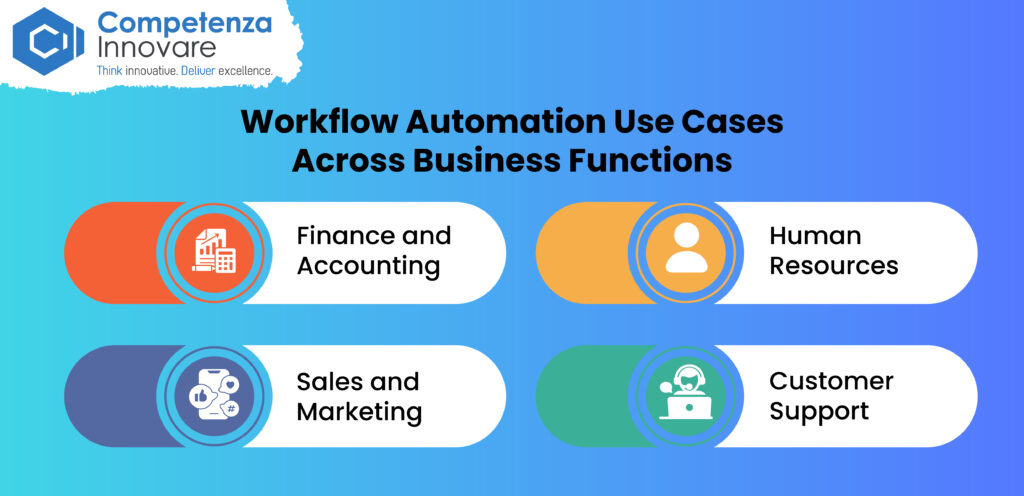
Workflow Automation Use Cases Across Business Functions
The use cases of workflow automation can be implemented in various departments to minimize repetition of work, accelerate the processes, and enhance productivity. Automated procedures enable businesses to free up their employees to do other important jobs.
Finance and Accounting
Finance software development teams are able to automate the approval of invoices, expenses, purchase requests, and procurement. This does away with manual data input and helps in expediting approvals.
Human Resources
HR teams may also automate the onboarding of the employees and leave requests, collections of documents, and performance reviews. This simplifies dealing with employee-related activities and maintaining information in order.
Sales and Marketing
Lead assignments, CRM updates, follow-ups, and campaign approvals can be automated by the sales and marketing teams. This assists the teams to act on the leads quickly and maintains customer information.
Customer Support
This routing of tickets, customer notifications, customer follow-ups, and escalations can be automated by customer support teams. The automatic tickets can be forwarded to the appropriate team, which will assist businesses in responding swiftly and offering suitable customer care.
On the whole, the automation of the workflow assists the various departments to minimize manual work, enhance the efficiency of processes, and ensure all those routine activities proceed normally.
Workflow Automation for Small Businesses
Small businesses are usually limited in both staff and resources, and they may struggle to cope with increasing workloads without automating them. To simplify routine tasks, save time of employees, and assist teams to work more efficiently, workflow automation for small businesses can be used.
Common Challenges Small Businesses Face
Small businesses are usually faced by a lack of personnel, work overload, and resource constraints. The employees end up wasting time in doing repetitive work like approvals, data input, emails, and document processing.
How Automation Supports Growth
Automation assists small enterprises in being more productive, as it does the repetitive jobs automatically. It saves the time of administration, makes the employees work on more meaningful things, provides better customer service, and utilizes the available resources better.
Affordable Automation Opportunities
Small enterprises will not have to automatize everything at once. On a limited scale, approval requests, customer onboarding, documenting, and internal employee requests are some of the simple workflows that they can begin with.
In order to minimize manual processes in business operations, which make business operations practical and cost-effective, it is important to start these repetitive processes rather than automation.
Also Read: Agentic AI for Workflow Automation: Beyond Traditional RPA
Workflow Automation Implementation: Key Considerations
An effective workflow automation implementation begins with the selection of appropriate processes and the creation of objectives. Automation can be applied in businesses with the following steps:
Identify Repetitive Processes
Target workflows that consume too much time of employees or always result in delays.
- High-volume tasks
- Repetitive business tasks
- Error-prone workflows
- Approval-heavy processes
Map Existing Workflows
Automate only after you know how it works.
- Go through processes.
- Identify the bottlenecks and delays.
- Find unnecessary manual labor.
- Find out the areas to improve.
Select the right automation platform
Find what will come in handy with your present and future aspirations.
- Simple connection with other systems.
- Expandability to increased workloads.
- Strong security
- Employees can easily use it.
Measure Success
Keep track of the results after the automation process to understand its implications.
- Time savings
- Cost reduction
- Fewer errors
- Higher productivity
- Better process efficiency
Measuring these outcomes also enables businesses to know their workflow automation ROI and optimize workflows in the long term.
Signs Your Business Needs Workflow Automation
Due to the increasing scale of the business, manual processes may prove to be time-consuming, expensive, and not easy to handle. When your team wastes too much time on monotonous duties, then it might be time to stop the use of manual processes in business operations by automating workflow.
Common signs include:
- Delays in the processes: It is characterized by prolonged alternatives of approvals and data entry and wasteful, repetitive routines.
- Increased administrative burden: The workers waste a lot of time as they do emails, contacting, paperwork, and duplication.
- High error rates: There is a possibility of errors, not receiving approvals, and duplicate entries in case of manual data entry.
- Invisibility of process: Teams do not operate with high visibility of tasks or the ability to locate the bottlenecks of the workflow.
- Increased operational costs: More manual work will translate to increased employee and administrative expenses.
- Difficulty scaling operations: As workload increases, more personnel and resources are needed to keep output unchanged.
Assuming that your business is not immune to some of these challenges, having a workflow with more automation is likely to make business processes smoother, lowering the amount of manual work and allowing more efficient business growth.
Why Businesses Choose Competenza for Workflow Automation Solutions
The choice of the respective automation partner could help companies to reduce the number of people working on manual jobs and optimize the daily operations. Competenza is a business workflow automation solution that can help in streamlining routines, connecting business systems, and optimizing the performance of processes.
End-to-End Workflow Automation Expertise
Competenza supports the whole automation process since the beginning of defining the present-day processes into developing automation solutions and improving them. These incorporate process evaluation, workflow development, workflow design, integration, and optimization.
Custom Automation Solutions
There are various needs of every business. Competenza designs tailored workflow automation software, depending on the required processes and industry. Solutions may also be incorporated with current systems to enable easier adoption of automation.
Scalable Automation for Growth
As your business expands, so should automation. The Competenza has concentrated on scalable and secure solutions that are able to support more and more workloads as well, enabling businesses to enhance and optimize their business workflow as time progresses.
Ready to eliminate manual processes? Automate workflows and improve efficiency with Competenza.
Conclusion
Manual processes can be effective when using smaller workloads, but as a business scales, these processes are likely to be slow, expensive, and full of error. The automation of workflow gives a more effective means of dealing with repetitiveness and approval, data entry, and day-to-day business.
With workflow automation software, companies are able to minimize manual efforts, enhance precision, save time, and manage the operational expenses. Unlike with manual methods, automation allows better visibility of various processes and makes staff handling of ever-increasing workloads more effective.
Finally, workflow automation is not all about the substitution of the manual tasks. It consists of faster, more precise, and scalable business processes that yield long-term growth and increased workflow automation ROI.
Frequently Asked Questions (FAQs)
What is the difference between a manual process and workflow automation?
A manual process relies on the employees to do and control every step; however, workflow automation refers to a set of rules that automatically service repetitive activities and approvals, as well as warnings. Automation assists companies to save time and lessen human effort.
How much can workflow automation reduce operational costs?
The savings will vary based on the process, workload, and automation. Businesses are able to save on costs by decreasing manual work, lessening mistakes, hastening procedures, and naturally utilizing employee time better.
What are the largest manual business workflow difficulties?
The most common ones are delays in the process, repetitive tasks, input errors, failed approvals, lack of visibility, and escalating administrative expenses. These problems may turn out to be harder to deal with as a business expands.
What is the benefit of workflow automation when it comes to accuracy?
Automation is subjected to established guidelines and standard operating procedures. It is able to automate data entry, perform data validation, assign tasks in the right direction, and maintain information up-to-date, which can reduce human errors and enhance the data accuracy.
Which kinds of business processes are to be automated first?
The use of repetitive, high-volume, and time-consuming tasks should be adopted by businesses. Typical applications consist of invoice processes, employee recruitment, customer requests, data processing, purchase authorization, and document processing.
Can small businesses automate their work processes?
Yes, the automation of small business workflow is able to assist teams in saving time, cutting down on administrative tasks, and keeping up with increasing workloads without necessarily having to start hiring additional employees. Small businesses may initiate with basic operations and add automation over time.
What is the ROI of automating the workflow?
Given the cost of automation and the savings of automation, ROI can also be calculated on workflow automation. The major metrics are time saved, costs saved on labor, the number of errors reduced, accelerated processing, and increased productivity.
Which industries do workflow automation software best suit?
Workflow automation can be of benefit almost in any industry. Among the most common ones are the fields of finance, healthcare, retail, manufacturing, education, IT, and professional services as well as customer care.
What is the impact of workflow automation on scaling?
Automation enables companies to manage rising workloads without having to apply the same amount of human resources. Managing work becomes easier as automated routing of tasks, approvals, notifications, and updates of data assist teams in handling a greater number of tasks.
What are the key advantages of workflow automation?
The key advantages are quicker procedures, reduced operation expenses, reduced errors, enhanced transparency, increased efficiency, and simplified scaling. It is also in the sense that employees are able to devote more time to doing more important business rather than repetitive duties.