

The 7 R’s of application modernization offer a best practice framework that assists companies in assessing the current legacy systems and selecting the most efficient modernization strategy. With the rapidly increasing rates of businesses’ digital transformation initiatives, the creation of a clear application modernization strategy has become a critical requirement in order to ensure a higher level of scalability, decreased technical debt, and the maximum utilization of the existing applications.
A large number of companies remain stuck with old systems that are not able to satisfy the current business needs, adapt to new technology, or handle cloud-native applications. Yet the 7 R’s of the strategy of successful modernization of the applications to the cloud are far more than merely migrating the applications to the cloud. It entails a strategic plan that coordinates the investments in technology with the business objectives, organizational needs, and a long-term enlargement.
Here, the 7 R’s of the application modernization framework will come in handy. Initially designed to lead cloud migration strategy and application transformation efforts, the framework assists enterprises to evaluate each application and decide on the optimal modernization strategy.
In this guide, we shall discuss each app modernization strategy, its advantages, and how organizations can identify the appropriate one to follow in their journey to modernization.
What Is Application Modernization?
Application modernization is the development of updating or transforming or optimizing existing applications to more closely meet modern business needs, cloud environments, and changing technology standards.
In contrast to basic infrastructure upgrades, the modernization is aimed at the enhancement of the application performance, scalability, maintainability, security, and user experience.
Modernization can involve:
- Migrating applications to the cloud
- Refactoring application code
- Replacing legacy systems with SaaS platforms
- Re-architecting monolithic applications into microservices
- Retiring obsolete systems
- Improving integrations and workflows
It is not only to maintain the current functionality but to establish a technological basis on the platform of which future growth and innovation can be built.
Where the 7 Rs came from: the Gartner to AWS Evolution
The R models did not come out of thin air. They developed throughout a period of over ten years as cloud computing got mature.
The original 5 Rs by Gartner first came about in 2011, which provided organizations with a method to categorize applications based on their suitability to the cloud. These original five were Rehost, Replatform, Repurchase, Refactor, and Retire. The model was developed further, as migration became more complex. It was the 6 Rs first when the approach of “retire” was added and then the 7 Rs in 2017 with the addition of “relocate.” The Retain approach was formalized as well in the process to appreciate that not all applications could or should go to the cloud at all.
Why Enterprises Need an Application Modernization Strategy
Most organizations are reluctant to modernize since their legacy systems are still in operation. Nevertheless, the upkeep of aging applications can impose control overhead and complexity. An established application modernization strategy assists organizations in:
Reduce Technical Debt
Older applications are also often full of old code, unreliable frameworks, and poor architectures, which becomes even more costly to maintain.
Improve Scalability
The latest cloud-native applications are able to scale automatically depending on the demand, and they assist organizations to enhance performance and also manage the costs.
Strengthen Security
The vulnerabilities and unsupported components of old applications as well as the compliance risks can be better handled by the modern architectures.
Accelerate Innovation
Modern apps allow rapid development processes, the use of DevOps, automation, and compatibility with new technologies like AI and machine learning.
Lower Operational Costs
The use of cloud-based infrastructure and the latest architectures may greatly save on hardware, maintenance, and operational costs.
Companies that take the initiative to modernize their application portfolios are usually more on par to compete in the increasingly digital market.
What Are the 7 R’s of Application Modernization?
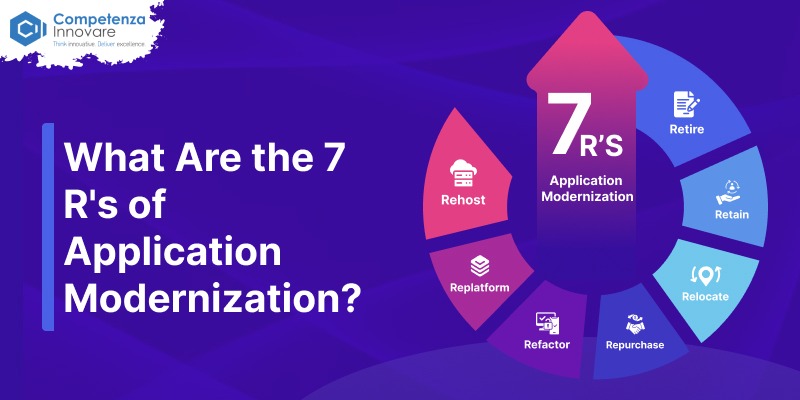
The 7 R’s of application modernization give an application assessment platform that identifies the most suitable route to take in modernization.
Organizations do not use a one-size-fits-all approach, but they weigh each of these applications and select the best course of action based on the business value, technical challenges, risk, and cost.
| Strategy | Purpose | Relative Cost | Risk | Typical Timeline | Best For |
| Rehost | Move applications with minimal changes | Low upfront | Low | Days to weeks | Fast cloud exit, stable apps, tight deadlines |
| Replatform | Make limited optimizations while migrating | Low–Medium | Low–Medium | Weeks | Quick wins with some cloud optimization |
| Refactor | Re-architect applications for cloud-native environments | High | Medium–High | 6–12 months per app | Business-critical apps needing scale and agility |
| Repurchase | Replace existing applications with SaaS solutions | Subscription | Medium | Weeks to months | Non-differentiating apps with strong SaaS options |
| Relocate | Move applications without major redesign | Low | Low | Days to weeks | Moving virtualized workloads between environments |
| Retain | Keep applications unchanged for now | Ongoing | Low | N/A | Stable or dependent apps not ready to move |
| Retire | Decommission obsolete applications | Negative (saves cost) | Low | Days to weeks | Redundant, unused or obsolete applications |
There are seven modernization strategies: Let’s take a closer look at each strategy.
- Rehost (Lift and Shift)
What Is Rehosting?
Rehosting is sometimes known as “lift-and-shift migration,” where an application is migrated to a new infrastructure platform with very limited modifications to the application. A typical migration of applications to cloud infrastructure involves organizations migrating an app that runs on top of on-premises servers and retaining the application architecture intact.
It is a goal of speed and ease and not change.
When Should You Choose Rehosting?
Rehosting can best be done when:
- Migration timelines are aggressive
- Applications require minimal modernization
- Cloud adoption is the primary objective
- Existing applications are relatively stable
- Budget constraints limit major redevelopment efforts
Organizations frequently rehost as a preliminary stage to a larger application modernization services roadmap.
Benefits of Rehosting
Faster Migration
Application code is not significantly changed, and thus migrations can be done in a very short time.
Lower Initial Costs
Rehosting reduces the amount of development work and enables organizations to start to benefit from the cloud earlier.
Reduced Infrastructure Management
Cloud environments also help in the elimination of most of the hardware management tasks.
Improved Business Continuity
During migration, applications will keep running with minimum disturbance.
Limitations of Rehosting
Despite the quick wins of rehosting, it is not the full utilization of cloud-native capabilities.
Organizations can continue to face the following:
- Scalability limitations
- Technical debt
- Legacy architecture constraints
- Ongoing maintenance challenges
Consequently, rehosting is also thought to be a transitional modernization approach.
Example
A manufacturing company moves its inventory management application out of an on-premises data center to a public cloud without changing the application codebase. Migration saves infrastructure expenditure yet preserves that of the current system.
- Replatform
What Is Replatforming?
During migration, republishing is a process wherein specific optimizations are made to an application without any alteration in its architecture.
This concept is often likened to lift, tinker, and shift, as it allows organizations to capitalize on cloud services without the need to redevelop on a grand scale.
How Replatforming Differs from Rehosting
Whereas rehosting attempts applications with practically no modifications, replatforming presents desired enhancements of the type of the following:
- Database modernization
- Managed cloud services
- Container adoption
- Performance optimization
The changes enhance efficiency and make development effort manageable.
Best Use Cases for Replatforming
Replatforming is best used when:
- Applications require moderate improvements
- Organizations want better cloud utilization
- Business disruption must remain minimal
- Legacy applications still provide significant value
Advantages of Replatforming
Better Performance – Cloud-native services are able to improve reliability and scalability.
Reduced Maintenance – Databases and infrastructure services are managed and help to cut the overhead in operations.
Rapid Time-to-Value – Organizations experience the benefits of modernization without having to redefine their projects on a grand scale.
Challenges
- Some technical debt remains
- Legacy design limitations may persist
- Long-term modernization requirements may still exist
Example
A retail company migrates to a cloud-based retailer portal and substitutes self-operated databases with managed cloud database offerings to enhance effectiveness and diminish the multicomponentity in operations.
- Refactor (Re-Architect)
What Is Application Refactoring?
Refactoring refers to repackaging and rewriting major sections of an application to fully utilize the opportunities of modern architectures and cloud-native solutions. It is the most transformative as well as resource-intensive of the strategies. Instead of maintaining the old architecture, you recreate the parts with the latest concepts.
When Refactoring Makes Sense
Refactoring is usually suggested in situations where:
- Applications are business critical
- Scalability requirements are increasing
- Existing architectures limit innovation
- Long-term competitiveness depends on modernization
Rehost vs Refactor vs Replatform
This is the analogy, which its readers demand most, and here it is unclothed. Rehosting copies the app as it is to save time. Replatforming makes a few cloud optimizations for a balanced payoff. Refactoring is a rebuild to give maximum long-term agility and scale to the app. The more effort, cost, and risk to recycle an application, the greater the long-term reward to the correct applications.
Migrating from Monoliths to Microservices
Refactoring is used by many enterprises to convert how to modernize a monolithic application into microservices architectures.
Microservices allow the following:
- Independent deployments
- Faster development cycles
- Improved resilience
- Greater scalability
The given approach is quite similar to the current DevOps and cloud-native development.
Benefits of Refactoring
- Enhanced agility
- Better performance
- Improved scalability
- Reduced technical debt
- Greater cloud optimization
Challenges
Refactoring requires:
- Significant investment
- Skilled development teams
- Longer implementation timelines
- Comprehensive testing
These difficulties notwithstanding, refactoring usually provides the best long-term benefit to strategic applications.
- Repurchase
What Does Repurchasing Mean?
Repurchasing entails the replacement of a current application with a commercially existing Software-as-a-Service (SaaS). Instead of updating or continuing with a legacy system, organizations have adopted a new platform with similar functionality or greater functionality.
The trend is gaining popularity as the SaaS platforms are also increasing in maturity and provide sound level functionality in CRM, ERP, HR, finance, collaboration, and customer service functionalities.
Replacing Legacy Software with SaaS Solutions
Numerous legacy application modernizations were custom-made many years ago to meet the needs of a particular business. With time, however, new SaaS offerings have developed to offer similar features with a higher degree of flexibility, security, and scalability.
Examples include:
- Replacing an on-premises CRM with Salesforce
- Migrating legacy HR software to Workday
- Moving from traditional ERP systems to cloud ERP platforms
- Replacing custom collaboration tools with Microsoft 365
Benefits of SaaS Adoption
Faster Deployment
SaaS solutions can be deployed by organizations very fast without requiring development delays.
Reduced Maintenance
The vendor takes care of infrastructure, updates, security patches, and feature extensions.
Lower Operational Costs
Pricing based on subscriptions can help in lowering the prices of maintaining the legacy systems.
Continuous Innovation
The SaaS vendors constantly add new features and capabilities.
Potential Risks and Considerations
Although repurchasing can be a quick way of modernizing, organizations ought to consider the following:
- Vendor lock-in risks
- Data migration complexity
- Integration requirements
- Subscription costs over time
- Customization limitations
Example Use Case
A financial services firm will update its old-fashioned customer support platform with a customer experience solution based on a cloud platform and provide AI-powered chatbots, omnichannel support, and an in-built analytics system.
- Relocate
What Is Application Relocation?
Relocation is used to transfer applications across virtualization environments without causing any significant modifications to the application.
As opposed to rehosting or replatforming, relocation is mainly infrastructure migration, but not application modernization.
Relocate vs. Rehost
Despite the fact that the two strategies seem the same, there are some significant differences.
Rehosting is a common process that may consist of transferring programs off of an on-premises environment to a cloud environment.
Relocation is generally the act of shifting workloads or virtual machines through similar environments with the minimum disturbance.
Typical Relocation Scenarios
Organizations might opt to relocate when:
- Mobility of workloads across cloud providers.
- Migration of VMware environments to cloud-hosted VMware services.
- Consolidating data centers
- Optimizing infrastructure costs
Benefits of Relocation
Minimal Application Changes
Applications are executed without rewrites.
Faster Migration
Organizations can outsource workloads at a fast rate.
Reduced Risk
In-place architectures are not eliminated.
Challenges
- Limited modernization benefits
- Technical debt remains
- Long-term transformation objectives might still need extra efforts in modernization.
- Retain
What is application retention?
Modernization is not needed in all applications. There are situations when it can be the most feasible choice to keep an application. A retention is to postpone the modernization to a later date, and keep an application as it is now.
When Should Applications Be Retained?
Applications are stored in those organizations that the system is stable and reliable, modernization is more costly than reward, business priorities are in other areas, or change is risky because of dependencies. Certain mission-critical systems continue to provide value even though they are old.
Applications are retained in organizations when:
- The application remains stable and reliable
- Modernization costs outweigh expected benefits
- Business priorities focus elsewhere
- Dependencies make modernization risky
Some of the systems that are mission-critical can still provide value even though they are old.
Cost-Benefit Analysis for Retention
To keep an application is to make a strategic decision and not a default response.
Organizations should evaluate:
- Maintenance costs
- Security risks
- Compliance requirements
- Business value
- Future modernization opportunities
Managing Retained Applications Effectively
Applications retained still need:
- Monitoring
- Security updates
- Performance management
- Documentation
- Governance oversight
There should be a definite review timeline here to re-evaluate the possibility of modernization in the future.
- Retire
Transform Legacy Applications Into Scalable, Future-Ready Solutions With Competenza.
What Does It Mean to Retire an Application?
The process of decommissioning applications that are no longer of value to the business enough leads to retirement. Throughout the years, many organizations end up accumulating enormous amounts of applications that lead to the duplication of systems, non-utilization of the software, and even unnecessary overhead maintenance costs.
Retirement of applications assists in simplifying and streamlining the operations.
Identifying Redundant Applications
Applicants can be people in retirement when:
- Usage is minimal or nonexistent
- Similar functionality exists elsewhere
- Maintenance costs exceed value
- Business processes have changed
- Compliance risks have increased
Benefits of Application Retirement
Reduced Costs
Organizations do away with licensing, infrastructure and support costs.
Lower Technical Debt
Selling off old systems makes the IT environments simple.
Improved Security
Elimination of the outdated applications lowers the attack surface.
Better Resource Allocation
The modernization efforts can be directed at strategic systems by teams.
Reducing IT Costs and Technical Debt
Application portfolio analysis often indicates huge possibilities to put out-of-use applications and other free resources onto higher priority modernization projects.
How to Build Your Application Modernization Roadmap
Through this guide, you will find the term roadmap used, hence the practical one below. A roadmap of modernization transforms a list of 7 Rs into a plan.
Step 1: Evaluate your applications portfolio. Identify all applications and business criticality, technical complexity, cost of operation, adoption by users, security posture, and integration dependencies. There is no way that you can select application strategies that you have not mapped.
Step 2: Select high-impact applications. Not all must move at once. Begin with applications with the most business value or the most intensive maintenance to become familiar with it and achieve payback sooner.
Step 3: Give each application an R. Through your evaluation, match your applications to corresponding best-fit strategies. There are three or five various Rs in the portfolio that you can expect to use, as opposed to a single one.
Step 4: Work-wave sequence. Divide workloads into migration waves and begin with less critical and lower-risk workloads to gain momentum and demonstrate the process. One manufacturing company, which had 250 applications, used them as a benchmark to classify all seven strategies and migrated in four waves within approximately 18 months, and the stage started with noncritical applications.
Step 5: pilot, measure, and scale. Confirm every wave against verifiable measures prior to going big. Early waves learn and adapt.
Step 6: Govern continuously. See modernization as a process instead of a project. Periodically re-evaluate every application in relation to business priorities and new technology.
How to Choose the Right Application Modernization Strategy
Begin by inquiring if the application has continued to provide business value. Otherwise, stop it. In case it does and a full-grown SaaS offering works to the same requirement, repurchase. In case you cannot change the sympathies and dependencies, or you just have other things higher in the table of priorities, keep it as it is, but with a date.
In the case of apps you are retaining and relocating, the query is to what level the business is worth the change. Rehost or relocate It could be the cloud platform or simply the hypervisor layer you change, but rather than running the hypervisor on the new emission, turn it off and turn it back on. To get a moderate payoff and moderate efforts, replatform. Refactor when the application is strategic, and the available architecture prevents expansion.
All the considerations on the way should include the cost of implementation, migration risk, required resources, expected ROI, and time to market, and remember that all decisions relating to such a business outcome as digital transformation, cloud adoption, better customer experience, operational efficiency, or higher revenues should be kept in mind. During the selection of a strategy to embrace modernization, one has to strike the balance between business, technical, risk, and financial interests.
Assess Your Application Portfolio
An impressive application portfolio should consider:
- Business criticality
- Technical complexity
- Operational costs
- User adoption
- Security requirements
- Integration dependencies
Evaluate Business Value and Technical Complexity
High business value applications and those with high technical constraints might warrant refactoring. Less strategic applications can be considered rehosting applications, purchasing applications, or retiring applications.
Consider Cost, Risk, and Time to Value
Every strategy of modernization has various trade-offs.
Organizations should consider:
- Implementation cost
- Migration risk
- Resource requirements
- Expected ROI
- Time-to-market
Align Modernization Decisions with Business Goals
The larger goals underpinned by successful modernization plans include:
- Digital transformation
- Cloud adoption
- Customer experience improvement
- Operational efficiency
- Revenue growth
Business outcomes should always be in line with technology decisions.
Common Application Modernization Challenges
Although application modernization has major fruits, organizations usually encounter difficulties that may influence the timeframes, expenses, and project enjoyment. Knowledge of the barriers aids companies in planning and minimizing the dangers of modernization.
Legacy System Dependencies
Several old applications are integrated with databases, third-party applications, and business-critical systems. Such dependencies may make modernization a difficult process, and they need to be evaluated carefully so as not to stall.
Data Migration Complexities
The process of migrating business-critical data is associated with data quality, transformation, validation, and governance challenges. Unless planned well, organizations can experience loss of data, compliance, or even disruption of operations.
Security and Compliance Concerns
Modernization programs should be strong with security measures and compliance with the regimes. During the application modernization process, frameworks such as protecting sensitive information, access control, and dealing with cloud security needs must be utilized.
Skills and Resource Gaps
The application modernization will involve cloud platform and DevOps expertise, service microarchitecture, automation, and development that are cloud-native. The shortage can be one of the factors that drag the project since a resource shortage in most organizations or a skilled shortage can slacken the project.
Managing Downtime and Business Continuity
During the modernization of business-critical applications, it is important to reduce service outages. The continuity of the business and reduction of the risks of operation during the transition will be assisted by phased migrations, rollback plans, and extensive testing.
The competence to reduce these issues by adequately planning and governing and the competence of modernization will go a long way in improving project results and ensuring digital transformation succeeds.
Benefits of a Successful Application Modernization Strategy
An effective application modernization strategy yields business and technical value. In addition to upgrading their legacy system modernization can assist organizations to become more agile, lower costs, enhance security, and enable future scaling as they grow and innovate.
Improved Business Agility
The new applications allow us to develop in less time, deploy in less time, and be more responsive to business requirements. DevOps practices and cloud-native designs can assist organizations in strategizing around the needs of the market as well as speeding up innovation.
Enhanced Scalability and Performance
New applications are modernized based on the application of the cloud infrastructure and scalable architectures, which influence the effective processing of increasing workloads. This enhances application performance, reliability, and user experience and promotes business growth.
Lower Operational Costs
Organizations will experience lower costs in terms of costs of infrastructure, maintenance, and tapping of resources and thus lower their overall operating costs by adopting cloud services, automation, and adopted platforms.
Stronger Security and Compliance
Modern platforms offer built-in security, continuous monitoring, encryption, and compliance controls to enable organizations to safeguard sensitive data and to achieve regulatory requirements more efficiently.
Faster Innovation and Time-to-Market
Modernization allows application developers to get new features, products, and services to market faster by using agile practices, CI/CD pipelines, and integrating with new technologies.
Improved Customer and Employee Experiences
The new applications are more efficient, reliable and easier to use, which increases customer satisfaction rates, employee efficiency and smooth digital operations.
Reduced Technical Debt
By modernizing, the IT department is able to reduce both the maintenance workload and old technologies, streamline application architectures, and do away with old infrastructure, so IT teams can concentrate on new innovation and not on legacy infrastructure.
Application Modernization Best Practices
An effective application modernization program does not just need a choice of the appropriate technology. To reduce risk and maximize the returns on the investments attracted by modernization, organizations should take a systematic methodology that aligns the modernization efforts with business objectives.
Start with an application assessment
The former is to seek business value, technical complexity, security risks, maintenance costs, and cloud readiness through analyzing your application portfolio. It can be applied to find out which modernization strategy fits in any application.
Prioritize High-Impact Applications
The former is connected with prioritizing applications with the most appropriate business value or where there are significant operational challenges. Making critical systems a priority aids in organizations attaining quicker and quantifiable outcomes.
Adopt a Phased Modernization Approach
Don’t turn it all modern at once; gradually change. Gradual modernization helps in mitigating risk, greater control of the project and the ability of teams to experiment with results, prior to the scaling activities.
Leverage Cloud-Native Technologies
Use cloud-first architecture, including containers, microservices, Kubernetes, serverless functions, and automation, to enhance scalability, flexibility, and operational efficiency.
Establish Clear Governance and KPIs
Determine the governance structures and performance KPIs, security, reliability, cost optimization, and business outcomes. The modernization efforts will be kept relevant to the organizational goals as a result of continual monitoring.
Align Modernization with Business Goals
Digital change, operational excellence, customer experience, or business development are the larger goals that should be supported by every modernization initiative in order to achieve the highest level of returns.
Encourage Cross-Functional Collaboration
The only way to achieve successful modernization is through coordination among IT personnel, business stakeholders, security, and operations personnel to be able to cater to both technical specifications and business needs.
Plan for Continuous Improvement
The process of application modernization is a continuous process. Periodically review application performance, new technologies, and changing business requirements in order to provide systems that would provide long-term value.
Conclusion
Modernization of applications is no longer an option for organizations wishing to keep afloat in a digital-first world. There is a strong need to identify strategic ways of modernization that consider innovation, risk, cost, and operational continuity, as legacy systems are too costly to maintain and less responsive to the needs of modern business.
The 7 R’s of application modernization framework offer a time-tested strategy of decision-making. The question of whether the correct approach is to rehost, replatform, refactor, repurchase, relocate, retain, or retire; each solution has a particular intent in the context of an overarching modernization roadmap.
An effective application modernization strategy starts with a comprehension of your application portfolio, alignment of technology choices with the business mission, and the proper choice of modernization for each workload.
When organizations thoughtfully undertake modernization efforts, they are able to decrease the technical debt, enhance agility, increase security, boost innovation, and make the most of cloud technologies.
Ready to Modernize Your Applications?
Assess your application portfolio, select the appropriate modernization, and create a technology foundation that is ready for the future. Engage with The Competenza, a professional application modernization vendor, to speed cloud adoption, lessen modernization risks, and realize business results.
Frequently Asked Questions
What are the 7 R’s of modernizing the application?
Application modernization has 7 Rs, namely, rehost, replatform, refactor, repurchase, relocate, retain, and retire. Through these strategies, organizations are able to identify the most successful legacy application modernization strategy, depending on the business and technical requirements.
Which application modernization strategy is best?
No standard best strategy exists. The most ideal solution would be based on business value, level of technical complexity, budget, level of risk-taking, and modernization goals.
What is the difference between rehosting and replatforming?
Rehosting shifts applications with limited modifications while replatforming implements specific optimizations to enhance performance and the use of the cloud without significant rearchitecture or redesign.
What is the right time to refactor an application?
Refactoring should be used when an application is of strategic value and needs important architectural changes to enhance the ability to be scaled, agile, and future-oriented in innovation.
What do businesses do to select an appropriate form of modernization?
Application portfolio assessment is a common exercise for organizations that analyze the business value, technical debt, the cost of modernization, risks, and anticipated outcomes.
What are the advantages of modernization of applications?
It has such benefits as better scalability, better security, reduced costs of operation, increased agility, accelerated innovation, and better support of digital transformation programs.
How long does an application modernization project take?
The timeframes depend on the complexity of the applications, modernization approach, and integration specifications, as well as organizational preparedness. Projects may be completed in a matter of a few weeks in the case of small migrations and many months or even years in case of massive change.
Which are the largest application modernization issues?
The usual pitfalls are old dependencies, the complexity of data migration, compliance issues, a lack of skills, and business continuity through change.
How much is the cost of application modernization?
The costs vary according to the strategies. Rehosting and relocating maintenance have low upfront costs, replatforming has moderate costs, and refactoring is the most expensive. The cost of shifting to subscriptions will be less than the cost of reducing an organization by retaining redundant applications. A majority of organizations strike a balance on these at the portfolio level.
What applications do you need to retire or modernize?
Terminate applications with low or no activity, duplicate capability in another application, maintenance expenditure that surpasses its worth, or increasing compliance risk. In practice, 10 to 20 percent of applications tend to be in 10 percent of portfolio assessments have undergone decommissioning.